Ben Thomas - Bits and PCs

Computers, Photography, Music.

  • Home
  • Photography
  • Mixes

Enable SFTP Support in cURL for PHP on Ubuntu 12.04 Server

Posted by Ben Thomas on April 18, 2013
Posted in: Development. Tagged: cURL, Linux, PHP, Servers, SFTP, Ubuntu 12.04. 2 comments

I recently did a project using cURL for PHP to SFTP files to a remote server… problem was, when I went to put the code live, SFTP wasn’t enabled in cURL. Doh! This is how I fixed it… don’t actually know if this is the “right” method, but it was tested on several servers and seemed to work well.

  • Make sure SFTP is not enabled already -

curl –version

  • If curl does not support SFTP currently we’ll build it

sudo apt-get install build-essential debhelper libssh2-1-dev
sudo apt-get source libcurl3
sudo apt-get build-dep libcurl3

cd curl-7.22.0/debian

  •  Edit the rules file to enable libssh2 support -

nano rules

- find and replace “–without-libssh2″ with “–with-libssh2″

  •  Build curl with ssh support -

cd ..

sudo dpkg-buildpackage

  •  This should not be needed, but if you receive an error about missing dependencies, install them with apt-get and try to build the package again

apt-get install autoconf automake1.9 libdb-dev libgcrypt11-dev libgnutls-dev libidn11-dev libkrb5-dev libldap2-dev libnss3-dev librtmp-dev libssl-dev libtool quilt

sudo dpkg-buildpackage

  •  Install the packages you’ve built

cd ..

sudo dpkg -i curl_7.22.0-3ubuntu4_amd64.deb
sudo dpkg -i libcurl3_7.22.0-3ubuntu4_amd64.deb
sudo dpkg -i libcurl3-gnutls_7.22.0-3ubuntu4_amd64.deb

  •  Cleanup the files you’ve created -

rm -fr curl*
rm -fr libcurl*

  •  Reload Apache so the new version of cURL you have compiled is picked up by PHP -

/etc/init.d/apache2 reload

And that should be it!

You can check it’s actually enabled in PHP easily enough:


<?php

var_dump(curl_version());

?>
Music Cue Sheet Generator – For Mixes

Posted by Ben Thomas on March 6, 2013
Posted in: Applications. Tagged: Applications, C#, cue sheet, development, Music, software. Leave a Comment

So I made this small application back in 2009, and was going to wait until I’d made this software compatible for multiple operating systems before I posted it on my blog, but it seems I’m never going to get round to it!

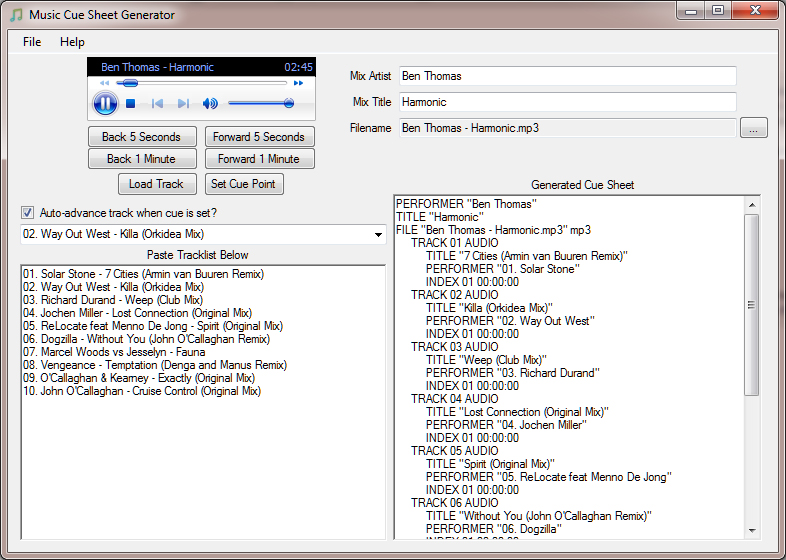
I made it in C# for generating cue sheets. You’re probably not going to want the software if you don’t know what a cue sheet is, but as Wikipedia says, “A cue sheet, or cue file, is a metadata file which describes how the tracks of a CD or DVD are laid out.”. You can also use them with some media players, such as the excellent Foobar2000.

Basically, you just paste a tracklist in using the “Artist – Title” format (without the quotes), putting each track on a new line, and load a track into it. You can then skip through the track in the embedded player and set cue points (based on whatever track is selected in the combo box). Feel free to comment if you get any problems and I’ll help out as much as I can.

You can download it here: Music Cue Sheet Generator

You’ll also need the .NET framework (version 3.5) if you haven’t already got it.

It’s in no way bulletproof, but it works well for my needs, so I never really improved it further :)

Hope it comes in handy for someone… here’s a screenshot:

Music Cue Sheet Generator

Music Cue Sheet Generator

Squeezebox Extension for Google Chrome

Posted by Ben Thomas on March 2, 2011
Posted in: Applications, Development. Tagged: Chrome Extension, Chrome Web Store, Google Chrome, Mini Squeezebox Control, Squeezebox. 4 comments

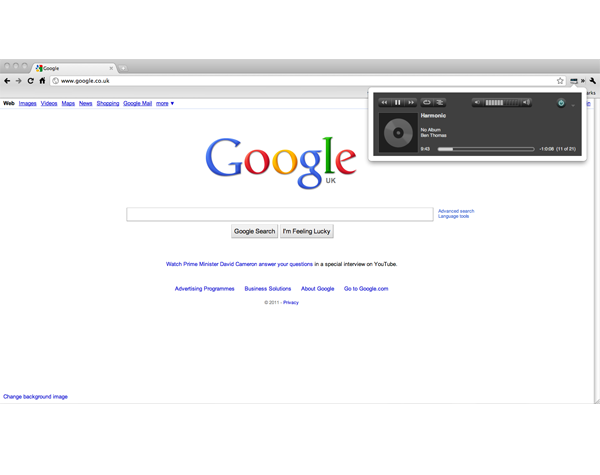
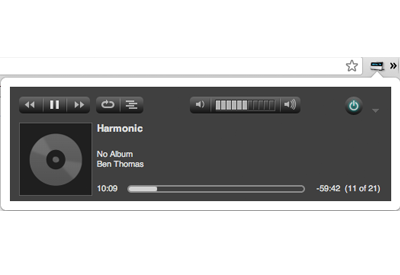
I bought a Squeezebox (Wireless Network Music Player) years ago. It’s got a web interface where you can view your music collection, add tracks to a playlist, change the volume etc… and I wanted a quick way to access it from my browser which didn’t mean navigating away from the page I was viewing.

So, I thought I’d try and make my first Chrome extension while I was at it! Awesome documentation/help files from Google as usual, it seemed to go smoothly enough. The extension is perfect for what I wanted, but may be a bit basic for some people.

I’ve added it to the Chrome Web Store anyway, here’s the link if anyone’s interested: Mini Squeezebox Control

Couple of small screenshots below:

Screenshot1
Screenshot2

Merging Facebook Contacts with Phone Contacts on Android

Posted by Ben Thomas on August 1, 2010
Posted in: android. Tagged: android, contacts, facebook, merge contacts. Leave a Comment
Android

Cool 3D Android

I was recently tidying up some “duplicate” entries in my mobile phonebook because when my phone downloaded all my contacts from Facebook, it didn’t link them all.

For some reason you can’t just add a mobile number or any additional information to the Facebook contact, so I was looking for a way to merge the two contacts I had into one.

For whatever reason, Google couldn’t help (maybe I didn’t look hard enough!), but after a few minutes playing around I found the option in my phone anyway.

Thought I’d post it here in case anyone else was having trouble, so here goes:

  1. Open up your contacts list and scroll down to the contact that you want to merge with another contact in your phone.
  2. Press to open it up and hit your menu button.
  3. Now press the “Edit contact” option.
  4. Press your menu button one more time.
  5. You should now see the magic “Join” button! So press on that.
  6. You’ll then get a list of “Suggested Contacts” to join with, so you can either pick one of them if they’re correct or show all contacts to find the one you want.

There you go, easy as 1, 2, 3… oh wait! Hope that helps someone.

Apologies if this was common knowlege! It does seem pretty deep in the menus though :)

P.S – I’m sure these instructions are easy enough for anyone to follow, but give me a shout if not and I’ll add screenshots :p

Middle Click Taskbar Icons to Close Windows 7 Programs

Posted by Ben Thomas on February 3, 2010
Posted in: Applications. Tagged: 7 Taskbar Tweaker, Taskbar Shuffle. Leave a Comment

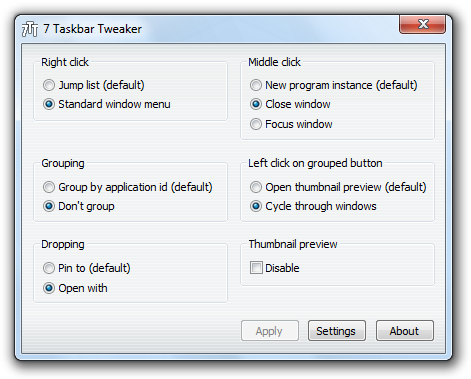
Windows 7 includes a new feature which allows you to hover over your taskbar icons, then middle click the thumbnail to close the program (similar functionality to closing Firefox tabs etc with a middle click). It annoyed me slightly having to click the thumbnail, rather than just being able to middle click the taskbar icon directly. The default action for middle clicking the taskbar icon directly is to open a new instance of the program… bit bizarre I think, but whatever.

So, I searched for a piece of software to add that functionality. Finally found a decent, lightweight one after Googling around for a while called 7 Taskbar Tweaker.

7 Taskbar Tweaker

7 Taskbar Tweaker

I had to install it again recently, and it took me a while to find it again. So this post is for my own reference more than anything! Hope it comes in useful for others anyway though.

Also, if you’re looking for something to do this on Windows XP or Vista, Taskbar Shuffle should do the trick.

PS3 Media Server

Posted by Ben Thomas on September 3, 2009
Posted in: Applications, Gaming, Multimedia. Tagged: MKV, PS3, PS3 Media Server, PS3MediaServer, Stream. Leave a Comment

I recently gave in to temptation and bought a PS3. Got a package with InFamous, Killzone 2 and Resistance 2. Loving it so far, definitely still keeping the Xbox 360 as well though.

Anyway, onto the real reason I was posting this. I’ve been looking for ages now for something that would play MKV files without any hassle… even muxing was becoming a pain in the arse as certain things still wouldn’t stream (depending on filesize and various other weird factors).

These are the things I’d tried to stream from (through the PS3 or Xbox):

Windows Media Player 11 – Extremely fast and nice to use when it worked, however, it didn’t support mkv or some older versions of DivX/XviD.

TVersity – Played everything I could throw at it, but it was totally unusable for MKV or any HD content. If I tried to pause, fast forward or rewind I just got a black screen for over 5 minutes until it started playing again.

Finally, I’d heard great things about PS3 Media Server but I wasn’t getting my hopes up too much as I thought it would be so similar to TVersity… how wrong I was! I don’t want to speak too soon, but so far after a few days of usage it’s been flawless. Plays everything I’ve thrown at it, relatively fast at transcoding when it needs to (not instant but it’s definitely short enough to be usable).

Another cool feature is the ability to go into the #–TRANSCODE–# folder and select which subtitles you want to use if a file has subtitles.

Best of all, it’s totally free. Plus because it’s written in Java, it works on Windows, Linux or Mac (I’ve only tested the Windows version though).

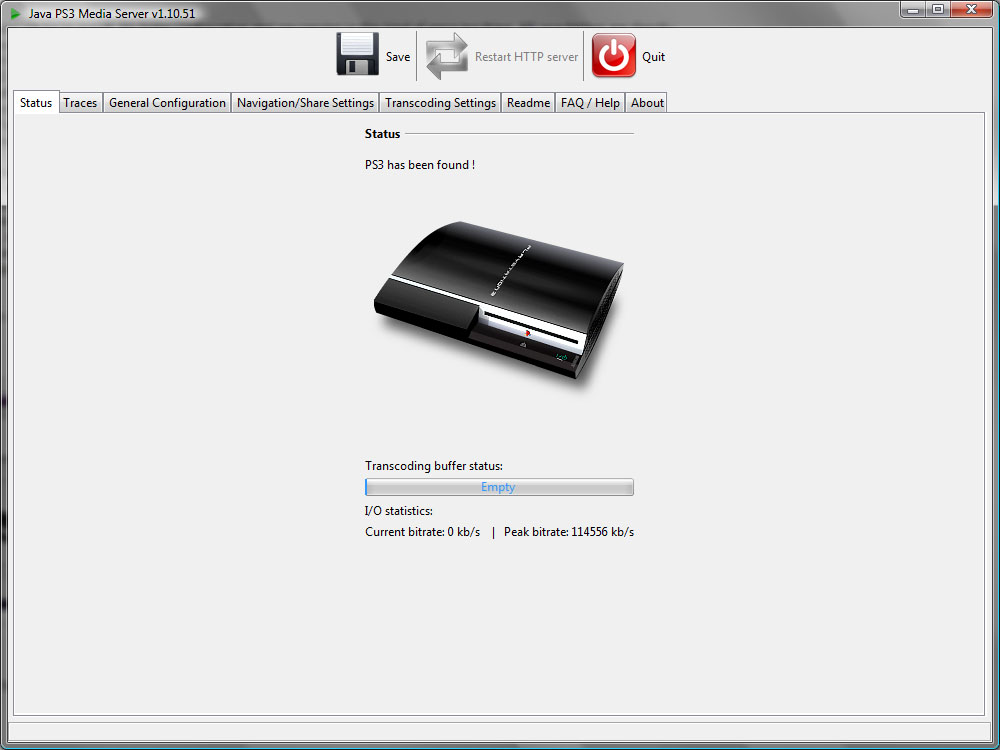
Here’s a screenshot of the main status page. I’m sure there’ll be plenty of images of the other screens around the internet, but if anyone wants to see any more just leave a comment.

PS3 Media Server

PS3 Media Server

So if you’re looking for something to stream any media from your PC (videos, music, pictures) to your PS3, then give PS3 Media Server a try! You won’t regret it. I know I didn’t anyway :)

Ever wanted to make your own movie?

Posted by Ben Thomas on June 18, 2009
Posted in: Uncategorized. Leave a Comment

It never ceases to amaze me the ideas people come up with when they’re in need of money for someone or something.

Recently saw this site buyacredit. It’s an idea conjured up by three guys that wanted to make a movie, basically you pay to have your name put on the end credits, in turn this obviously funds the making of the film.

Here’s the info from the “about” section on their site:

BUYACREDIT.COM is a ground-breaking new project aiming to raise the sum of One Million Pounds in order to fund the upcoming feature film “Dardentor”.

We have turned to the public to help us fund the movie. To put it simply, we’re selling its end credits online, here at BUYACREDIT.COM. For just one pound/two dollars YOU can become a movie producer and see YOUR name roll down on the end credits of the upcoming commercial motion picture “Dardentor”.

NEW ADDITION: Now for just 50 pounds/$100 you can buy advertising space on the all new Advert Patchwork and on the end credits.

The project has been going from strength to strength and has already captured the imaginations of thousands across the World. Industry professionals, celebrities, journalists and directors have sung nothing but praise for the project and are extremely confident for its future.

BUYACREDIT.COM is taking a brave new leap into the world of cinema, and it wants every single one of you to be a part of it!

BUYACREDIT now and be a part of cinema history!

Pretty clever idea. I don’t think I’d ever bother buying one, but I’m sure thousands of people will. No doubt it’ll be as successful as the million dollar homepage was. I just find it crazy how one idea can make so much money in so little time (assuming they pull  it off).

Good luck to them. I just need to think of something now :)

Dark Eye

Posted by Ben Thomas on May 30, 2009
Posted in: Photography. Tagged: Dogs, Macro, Photography, Rough Collie. Leave a Comment

Dark Eye, originally uploaded by Tiestarian.

Just testing out the blog functionality from Flickr. Only recently started using Flickr to host my photos but it’s really nice so far. Much easier than creating a gallery manually anyway, and hopefully they’ll get more views on there.

This is a picture of my Mum’s dog. Taken with a Canon EOS 40D using the 100mm f/2.8 Macro lens. Not the greatest shot in the world obviously but there’s something about it that I really like :)

Pixario – 3D Animation Based on Mario

Posted by Ben Thomas on April 26, 2009
Posted in: Animation. Tagged: Animation, Mario, Maya, Pixar. Leave a Comment

This is another assignment I had to do for uni. We had to use a lamp similar to the one you see at the start of Pixar movies and animate it in any way we wanted.

I decided to do a Mario style theme! It’s my first ever animation so it’s still very rough around the edges.

Pixario

Pixario

Here’s the link. You’ll need the xvid coded installed to play it:
Pixario – 3D Animation (Direct Download)

Alternatively, you can view a HD version on YouTube. It’s slightly jerky on YouTube though unfortunately:
Pixario – 3D Animation (YouTube)

It was created in Maya 2008. The individual frames were rendered at 768×576 resolution and then compiled with audio and title sequences using Adobe Premiere.

Hope you enjoy it! :)

Spotify – Stream Music

Posted by Ben Thomas on January 11, 2009
Posted in: Applications. Tagged: Applications, Music, Spotify, Stream. Leave a Comment

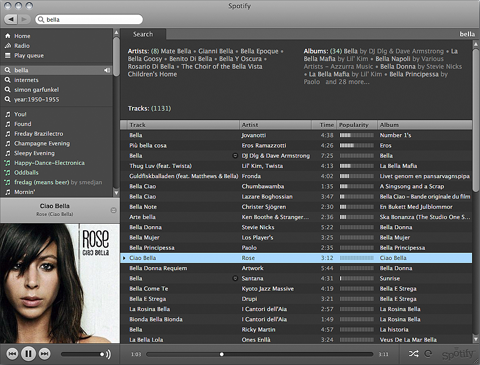
Found another cool application the other day, it’s similar to Last.fm in the fact you can stream music and find similar artists you might enjoy etc. You can also stream full albums, add music to a queue and create playlists. The quality isn’t perfect but it’s listenable, much better than most free “web” services. This is actually a desktop application though.

Here’s a few excerpts from their FAQ, they do a better job of explaining it than I can.

What is Spotify?
Spotify offers you legal and free access to a huge library of music. All you need to do is create an account and download our streaming music player.
What is your goal?
Our dream is to let everyone listen to whatever they want, whenever and wherever they want.
Do I need to pay to use Spotify?
No, the advertising-funded version of Spotify is free of charge, however, for now it requires that you receive an invite to register. Alternatively, you can pay for an ad-free subscription to Spotify.

I’ve been listening for quite a while now and I’ve only heard one short advert so far, so it’s totally acceptable in that respect unless you really hate ads. I’ve got a feeling ads will get more frequent as their user base grows but for now it’s great.

It’s only officially available for Windows and Mac at the moment but apparently it works under Wine on Linux.

Here’s a screenshot from their site:

Spotify

Spotify

Posts navigation

← Older Entries
  • Search

  • May 2013
    M T W T F S S
    « Apr    
     12345
    6789101112
    13141516171819
    20212223242526
    2728293031  
  • Twitter: tiestarian

    • RT @EquineCreatives: ECN member focus: Emily Mayman - The Equine Artist... http://t.co/y8HV92vXG2 09:23:36 PM April 04, 2013 from web
    @tiestarian
  • Random Quote

    Optimism: Waiting for a ship to come in when you haven’t sent one out. — Unknown

  • Links

    • Computer Repair Leicestershire
    • Horse Artist
    • Midlands Cycles
    • Swift Furniture
Proudly powered by WordPress Theme: Parament by Automattic.